What it took to build a website with Claude Code, with no coding background
 Channara Vot
Research and Intelligence Lead · Lean Six Sigma White Belt
Channara Vot
Research and Intelligence Lead · Lean Six Sigma White Belt
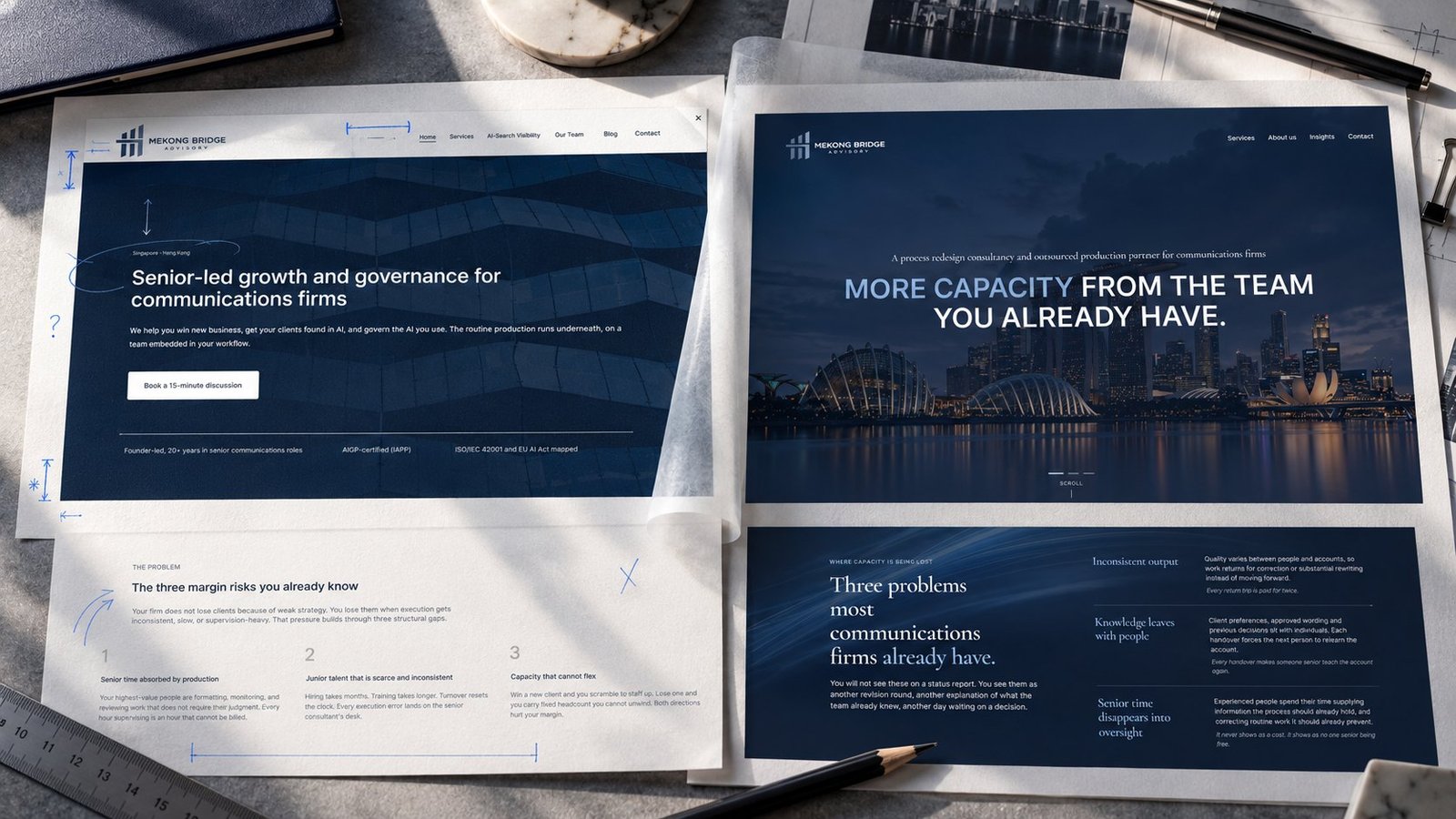
I had never opened a code editor when I was handed our company website to rebuild from scratch, with no developer to call.
I'm MBA's Research and Intelligence Lead. My work is market research, reports and communications. I had never thought about where a website lives, or what happens between someone typing our address and our homepage appearing.
The site needed the work. Our positioning had changed and the copy had been rewritten, but the old site on Squarespace still described the firm we used to be. Our founder also wanted to test something: could someone with no coding background build a website with Claude Code, with no developer on the team? I was the test case.
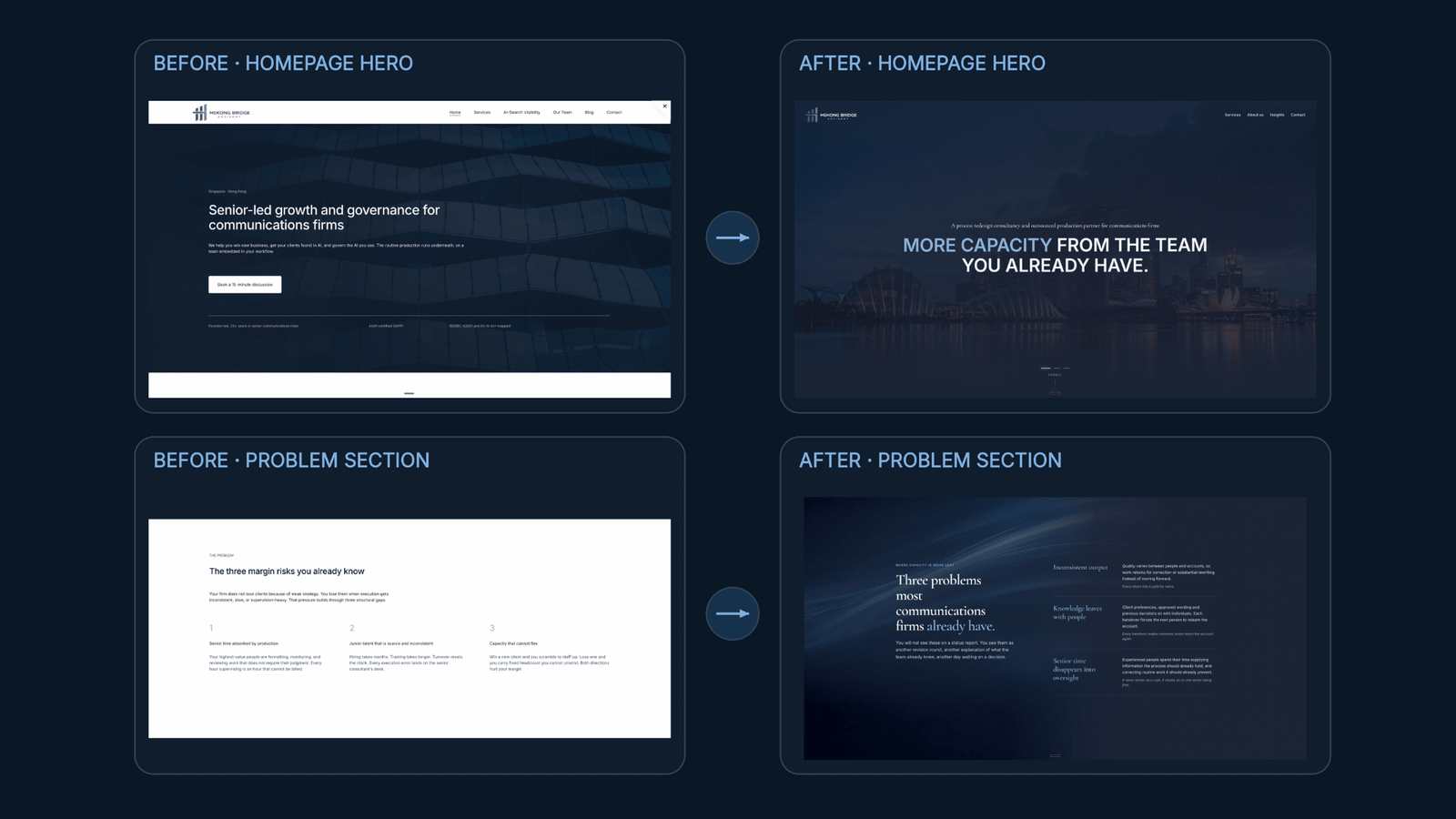
Today the new site is live, running on code I directed end to end without writing a line of it myself. Claude Code wrote the code. My job was every call a developer would normally make: what the site should look like, how it should feel to use, and when to admit that something I'd approved wasn't good enough. I got that last one wrong more than once.
If you run a PR firm, you won't touch any of what follows yourself. I've kept the detail in so you can see what a rebuild involves.
The tools, and how they connect
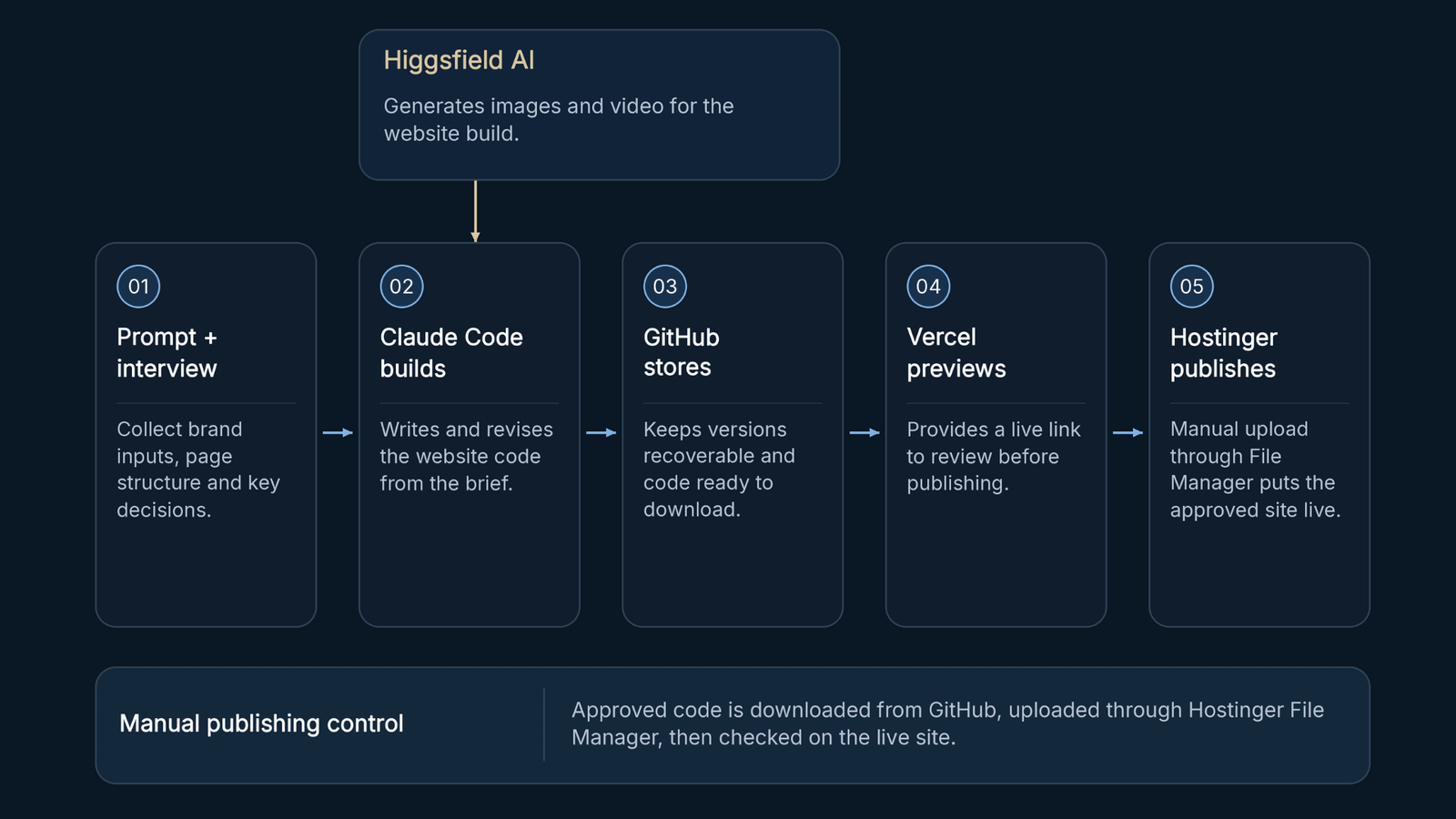
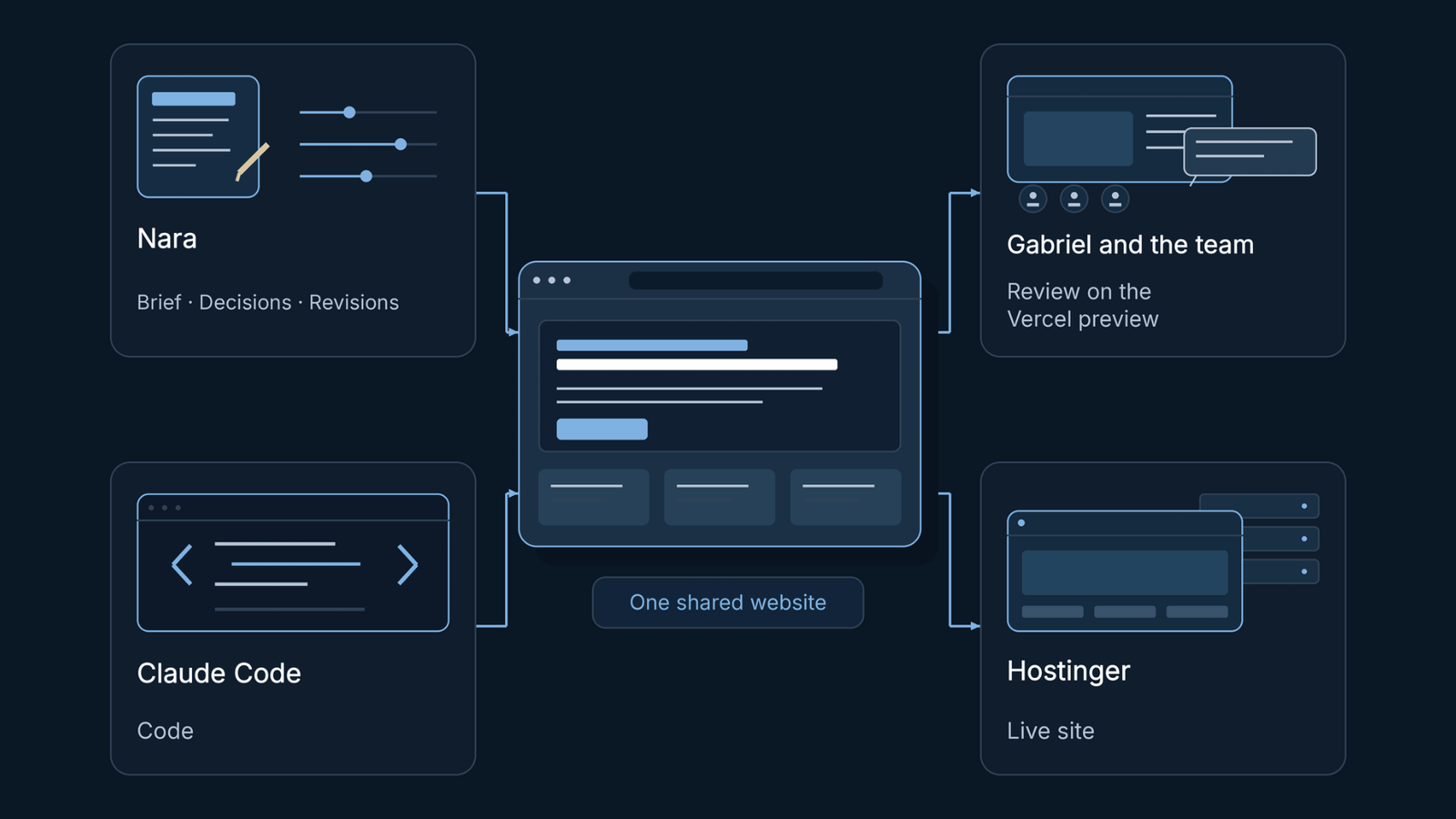
Five tools did the work: Claude Code, GitHub, Vercel, Hostinger and Higgsfield.
Claude Code wrote and rewrote the site's code based on what I asked for.
GitHub kept every saved version, on the free plan, so nothing was lost when I changed my mind.
Vercel picked up each update automatically and put up a live preview link. That link was for review only, not the address people visit.
Higgsfield, on its Pro plan, generated the images and video the site needed.
Hostinger, on our Unlimited annual plan, is where the site lives. Moving a change to the real site took a manual step every time: download the latest version from GitHub as a ZIP file, then upload it through Hostinger's File Manager. That works because the site is plain HTML, CSS and JavaScript, so the files in GitHub are the files visitors load. Nothing went live until one of us put it there.
Building and publishing were two separate jobs, done one after the other.
How the build went
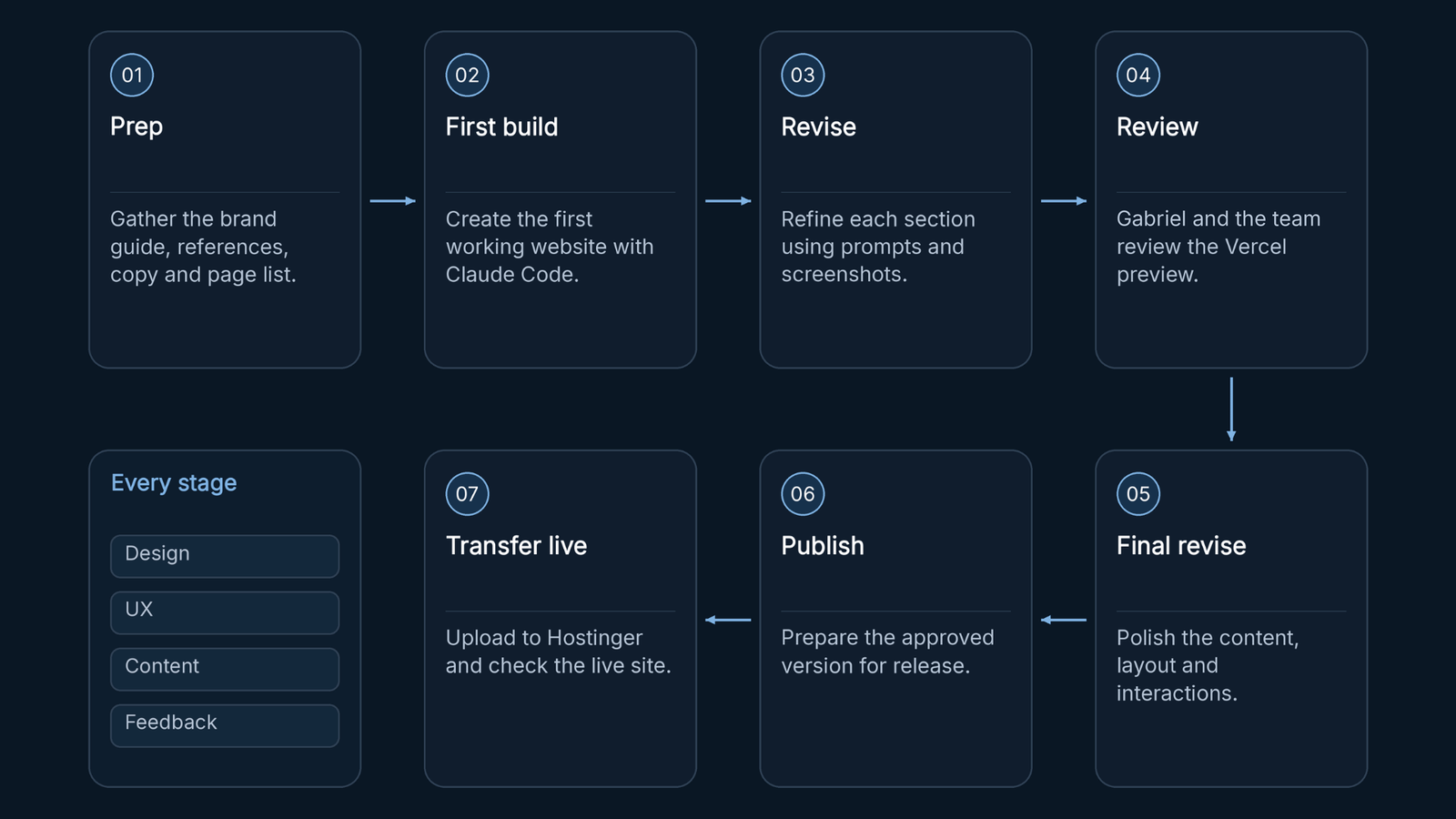
Prep came first, before I opened Claude. I gathered:
- Our brand guide
- A few reference sites whose feel we liked
- The content from our old site worth keeping
- A rough list of the pages we needed
- Our new website copy and positioning, the actual words the site had to carry
Two more things kick off the build: the prompt and the interview guide. You can walk in with both ready, or build them as you go. We did some of both. The logic is the same as briefing an AI agent: give it the source material and context before asking it to build.
The prompt included our actual website copy, so Claude Code had real words to work with from the start. We asked it to wait, then fed it the interview guide. Claude Code then interviewed us in four rounds:
- Round 1: business and tone
- Round 2: references
- Round 3: brand assets
- Round 4: page structure
We answered each round, asked it to wait again, and only after all four did the first build begin.
Then I clicked through it myself, and I approved the page layout and spacing too early. The pages felt crowded and the sections sat in the wrong order. I didn't see it until the team review caught it. I went back to Claude Code with a screenshot of each section, reference links, a new section order, and a clearer description of the spacing I wanted.
That became the pattern for every revision. Prompt Claude Code, explain the purpose of the change, give it references with links or screenshots, describe the visual style (transitions, animations, icons, colours, text treatment), and attach a screenshot of the exact section being revised.
The team review
I didn't build this alone. Most of the corrections that mattered came from putting the Vercel preview in front of Gabriel Tan, our founder, and the rest of the team, and asking whether it was right, not whether it looked finished.
My colleague Somalis reviewed it, and so did a friend of mine who works in banking and finance and has some website development experience. Somalis's feedback was about consistency. The design styles didn't match, the animations were too much, and the site didn't look like a firm senior PR leaders would hire. My friend's feedback was about the first impression: the early version looked generic, like something an AI had made. I cut the site down to fewer visual styles, reduced the animation, and made the look less generic.
Each round of feedback went back into Claude Code the same way as my own revisions. Once a version was approved, it moved from the Vercel preview to the live site through the Hostinger upload.
The day the site looked broken
The worst moment came after the site was finished.
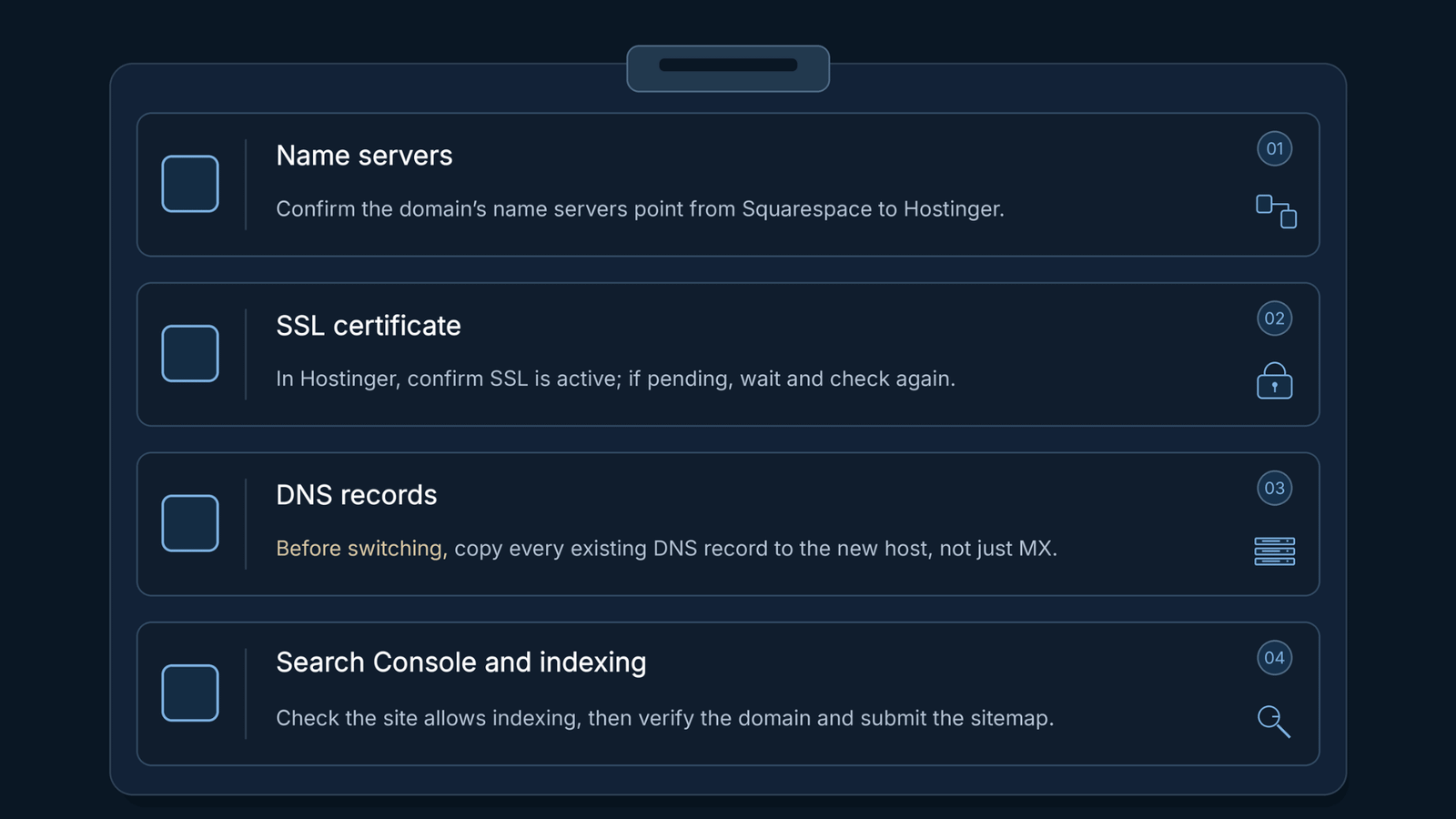
A domain's name servers tell the internet where to find its DNS records. Those are the settings that say which server shows your website and which one receives your email. To go live, we pointed ours from Squarespace to Hostinger. We also moved the domain registration itself to Hostinger, as a separate transfer.
Right after the switch, the site looked broken to anyone visiting it. Nothing was wrong with the build. Hostinger can only issue the SSL certificate, which lets a site load securely, once the domain points to it. Until then, browsers show a security warning. The fix was simple: log into Hostinger and check whether the certificate is active. Active means the site loads over https with no warning. Not active means it's still being issued, so you wait and check again.
Two more things caught us out.
Email. Our email runs on Google Workspace, and its records sit in the same DNS settings as the website: MX records for incoming mail, plus the TXT records Google uses for sending and verification. When the name servers move, all of those records have to exist at the new host. We didn't copy ours over in time. For a while, mail sent to one of our addresses bounced, and some of it never arrived. Once we fixed the MX records at Hostinger, mail started arriving again. That's why DNS records are now step three on our checklist, done before the switch, not after.
Google Search Console. Google already knew our domain from the old site, but after the switch it kept only our homepage in its index. Every other page dropped out. The site files were still set to block search engines in two places. The robots.txt file told Google's crawler to stay out of the whole site, and a noindex tag in each page's code told Google not to list the page. I asked Claude Code to change robots.txt from Disallow to Allow and to remove the noindex tag from every page. Then I submitted the sitemap in Search Console and requested indexing for the main pages. A day or two later, all the main pages and most of the blog posts were back in Google. Search Console is also where you verify that you own the domain and check that old addresses don't lead to error pages. Our blog posts kept their old addresses, so we needed no redirects.
None of these four are hard once you know to look for them. All four are easy to miss otherwise.
What I learned
The tool writes the code. The calls are still yours. Claude Code never told me the layout was crowded or the sections were in the wrong order. I had to see it, or someone had to show me.
Put the preview in front of other people early. Most of the fixes that mattered came from the team review, not from me.
Going live is a separate job from building. The SSL certificate, our email records and Google indexing each caught us out after the site itself was finished.
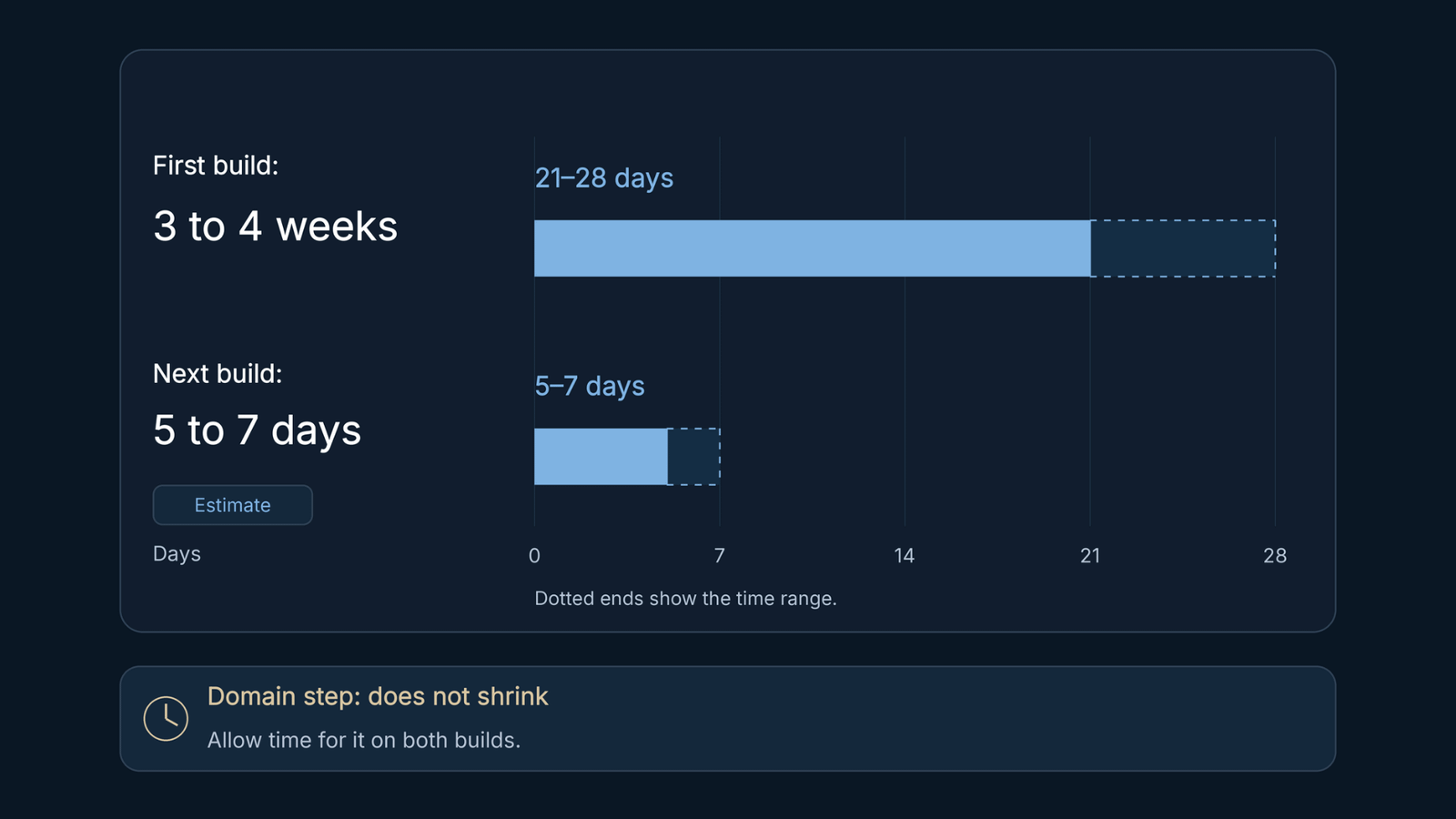
The new site is easier to find your way around, and visitors notice that without knowing what went into it. The first build took three to four weeks around my regular job. Doing it again, I'd say five to seven days, not less, because a domain transfer still takes real time.
How this applies to a PR firm
Most of the PR firms we talk to don't build their own websites. They pay an outside agency, or they live with a site that no longer says what they do.
Most of MBA's work is process redesign consulting for workflows that already exist. We use DMAIC for that: define, measure, analyse, improve, control. This project was different. There was no process to fix, so we built one. Six Sigma has a name for that: DMADV, which stands for define, measure, analyse, design, verify. It comes from Design for Six Sigma, the branch built for new processes.
Every step in this post is now written down as a repeatable agency workflow: the prep list, the prompt, the interview guide, the revision pattern and the go-live checklist. We've run it once, on our own site, and it's built to run again.
How we can help
We can now run the same website redesign process for your firm. You bring what I had to gather at the start: your brand guide, your copy, and a few sites whose feel you like. We handle the build, the review rounds and the go-live checks, including the ones that caught us out.
I started this project never having opened a code editor. Every mistake in this post is one we now check for before it can happen on your site. If your site no longer says what your firm does, get in touch.